
What Database Indexes Actually Do (And When to Use Them)
A Practical Guide to Query Performance, Composite Indexes, B-Trees, and Real-World Database Optimization

Database indexes are one of the most frequently discussed topics in system design interviews.
They appear in conversations about scalability, performance optimization, database bottlenecks, query latency, and production troubleshooting. Interviewers often expect candidates to understand not only what indexes are, but also when to use them and when they become a problem.
Unfortunately, many engineers learn indexes through memorization.
They hear statements like:
“Indexes make queries faster.”
While technically true, that explanation is incomplete.
Indexes improve some operations.
They make other operations slower.
They consume storage.
They increase write costs.
They require maintenance.
Understanding these trade-offs is what interviewers are actually looking for.
In system design interviews, you are rarely asked to explain SQL syntax.
You are usually asked to explain performance.
Indexes are one of the most important tools for doing that.
Why Databases Become Slow
Before discussing indexes, it helps to understand the problem they solve.
Imagine a table containing ten users.
Finding a specific user is easy.
The database can simply check each row one by one.
Now imagine a table containing:
1 million users
100 million users
1 billion users
The situation changes dramatically.
If the database must inspect every row to find a single record, query performance becomes increasingly expensive as the table grows.
This process is called a full table scan.
The database literally examines rows until it finds what it needs.
For small datasets, this is acceptable.
For large datasets, it becomes a serious bottleneck.
This is where indexes enter the picture.
What Is a Database Index?
A database index is a separate data structure that helps the database locate data more efficiently.
Instead of searching every row, the database can consult the index and jump directly to the relevant records.
A useful analogy is the index at the back of a book.
Imagine a 1,000-page textbook.
Suppose you want to find information about distributed systems.
You could start reading page one and continue until you eventually find the topic.
That would work.
It would also be painfully inefficient.
Instead, you use the book’s index.
The index tells you exactly where the relevant pages are located.
Database indexes work in a similar way.
They help databases find data without scanning everything.
Life Without an Index
Consider a simple users table.
Users

ID   Name
1    Alice
2    Bob
3    Charlie
...
Now suppose someone runs:
SELECT *
FROM Users
WHERE Name = 'Bob';
Without an index on Name, the database may need to inspect every row.
For a small table, that is not a problem.
For a table containing hundreds of millions of rows, the cost becomes significant.
The larger the table grows, the more painful full table scans become.
This is why indexes exist.
Life With an Index
Now imagine an index exists on Name.
Instead of examining every row, the database consults the index.
The index quickly identifies where “Bob” exists.
The database retrieves the matching row.
The query completes much faster.
The larger the dataset becomes, the greater the benefit.
This is why indexes are one of the first performance optimizations engineers consider.
The Mental Model Interviewers Want
Many candidates stop here.
They say:
“Indexes make queries faster.”
That answer is incomplete.
A stronger answer is:
“Indexes trade additional storage and write overhead for faster reads.”
This demonstrates understanding.
Indexes are not free.
Every optimization introduces trade-offs.
Strong candidates discuss those trade-offs naturally.
Why Indexes Are So Effective
Indexes work because they avoid unnecessary work.
Instead of checking:
Row 1
Row 2
Row 3
Row 4
...
Row 100 million
The database uses an organized structure that narrows the search dramatically.
The result is fewer disk reads, fewer memory accesses, and lower latency.
This difference can transform query performance.
In many real systems, queries that take seconds without indexes execute in milliseconds with indexes.
B-Trees: The Most Common Index Structure
Most relational databases use B-Trees for indexing.
You do not need to understand every implementation detail for interviews.
You do need to understand the high-level idea.
A B-Tree organizes values in sorted order.
Instead of checking rows one by one, the database repeatedly narrows the search space.
Think about searching for a word in a dictionary.
You do not start on page one.
You open somewhere near the middle.
Then you eliminate half the remaining pages.
Then half again.
The search becomes dramatically faster.
B-Trees use a similar strategy.
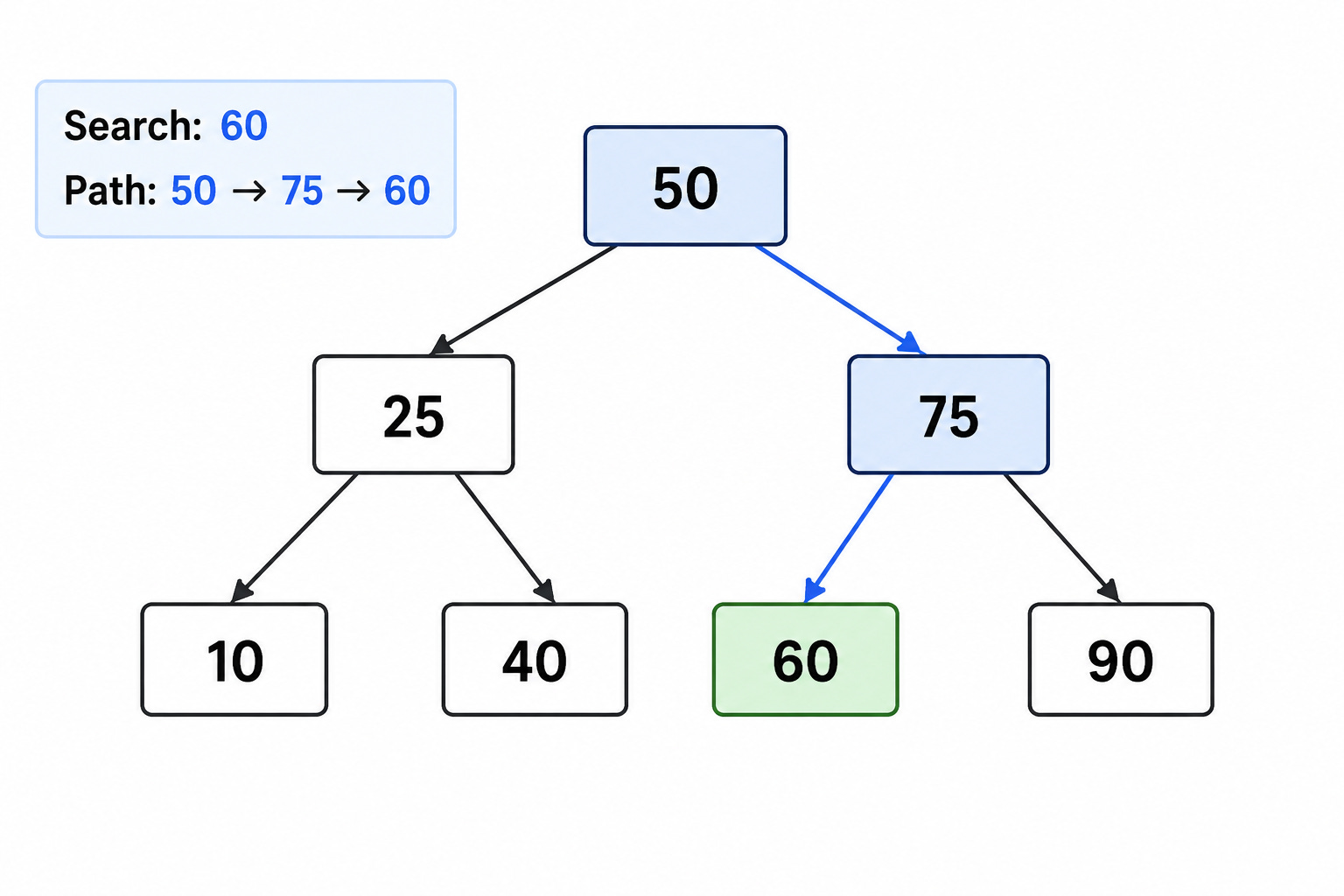
This is one reason databases can efficiently retrieve records from extremely large tables.
Why Interviewers Mention B-Trees
System design interviews occasionally ask:
“What kind of data structure powers a database index?”
The most common answer is:
B-Tree.
The interviewer is usually not testing database internals.
They are testing whether you understand why lookups are efficient.
The key takeaway is that indexes create an organized path to data.
Without them, the database often scans everything.
With them, the database navigates directly toward the answer.
Primary Key Indexes
Most engineers encounter indexes before realizing it.
Consider a table:
Users

UserID
Name
Email
The primary key often receives an index automatically.
For example:
PRIMARY KEY(UserID)
The database creates an index because primary-key lookups are extremely common.
Queries such as:
SELECT *
FROM Users
WHERE UserID = 123;
become very efficient.
This is one reason primary-key retrieval is typically fast even in large systems.
Secondary Indexes
Indexes are not limited to primary keys.
Suppose users frequently search by email.
You might create an index on:
Email
Now queries using email become much faster.
This is called a secondary index.
Many production systems contain dozens or even hundreds of secondary indexes supporting common query patterns.
The important phrase is:
“Common query patterns.”
Indexes should support actual workloads.
Not hypothetical workloads.
A Critical Interview Question
Imagine a users table containing:
UserID
Name
Email
Country
You can only add one index.
Which field should you choose?
Many candidates immediately answer:
“Email.”
But the correct answer depends entirely on usage.
Interviewers care about reasoning.
If most queries filter by country, indexing email provides little value.
If every login uses email, indexing email becomes extremely valuable.
Indexes should reflect access patterns.
That is one of the most important lessons in database design.
Why More Indexes Are Not Always Better
Beginners often assume:
More indexes = faster database.
Reality is more complicated.
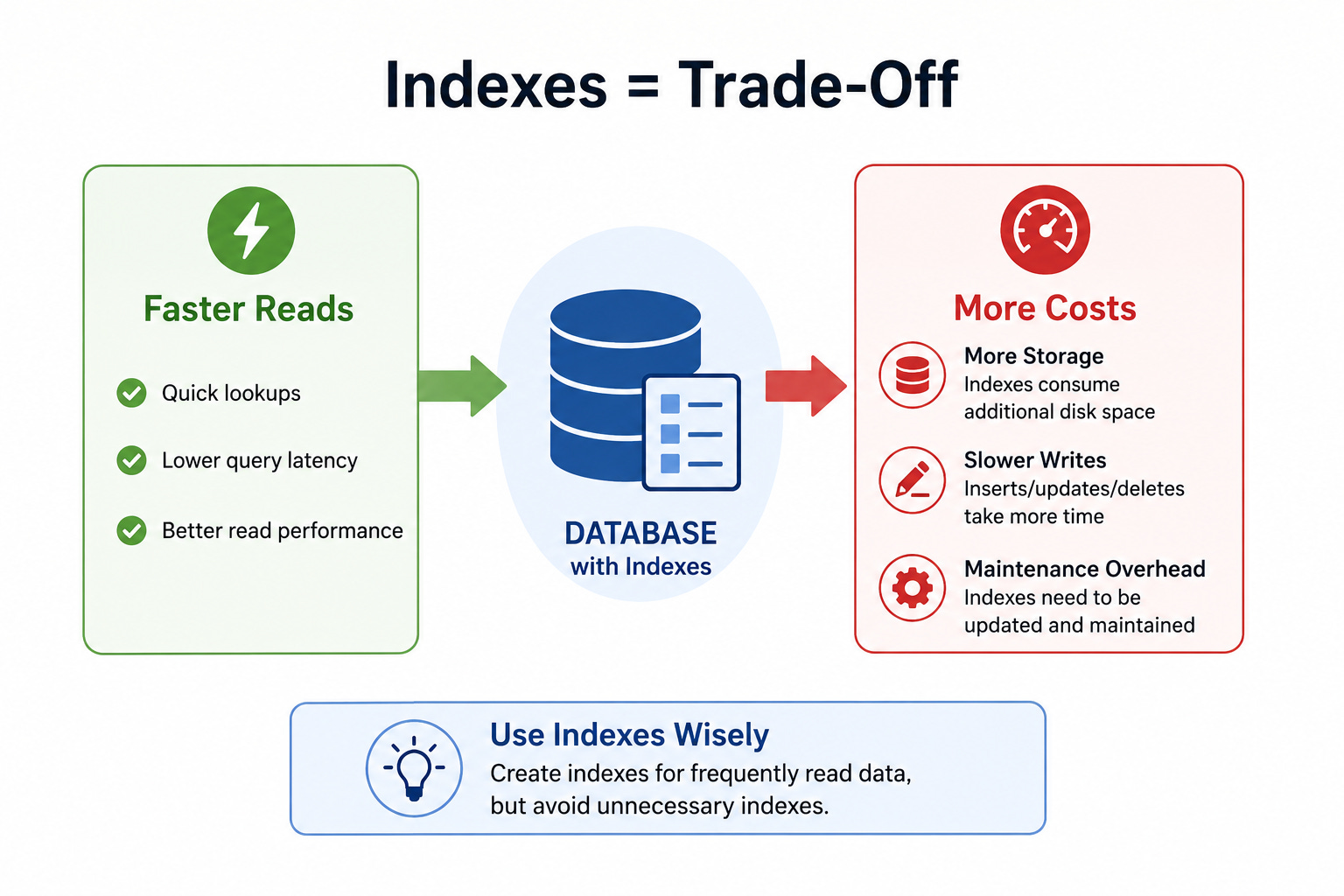
Indexes accelerate reads.
They also create costs.
Every index consumes storage.
Every index must be updated when data changes.
Every insert becomes more expensive.
Every update becomes more expensive.
Every delete becomes more expensive.
The database must maintain the index structure.
This work adds overhead.
Strong engineers understand that indexes improve some workloads while hurting others.
The Read vs Write Trade-Off
This trade-off appears constantly in system design interviews.
Suppose a table receives:
Millions of reads
Very few writes
Indexes are usually valuable.
Now consider:
Millions of writes
Very few reads
The situation changes.
The cost of maintaining indexes may outweigh their benefits.
This is why index decisions depend heavily on workload characteristics.
There is no universal answer.
The First Performance Question to Ask
Whenever someone says:
“The database is slow.”
Do not immediately suggest caching.
Do not immediately suggest sharding.
Do not immediately suggest migrating databases.
Ask a simpler question first:
“Are the important queries properly indexed?”
In real systems, missing indexes are responsible for a surprising number of performance problems.
Sometimes the fastest optimization is not architectural complexity.
Sometimes it is a single well-chosen index.
Why Indexes Appear in System Design Interviews
System design interviews frequently involve large-scale applications.
Eventually the conversation reaches database performance.
At that point, interviewers want to know whether you understand basic optimization principles.
Indexes are one of the most fundamental tools available.
Understanding them demonstrates:
Performance awareness
Scalability awareness
Query optimization knowledge
Database fundamentals
Those are exactly the skills system design interviews aim to evaluate.
Composite Indexes
So far we’ve discussed indexes on a single column.
Real production systems often require something more powerful.
Consider an e-commerce platform.
Suppose users frequently run queries like:
SELECT *
FROM Orders
WHERE CustomerID = 123
AND Status = 'Delivered';
Many candidates assume creating separate indexes on CustomerID and Status is sufficient.
Sometimes it helps.
Often it is not the best solution.
This is where composite indexes become important.
A composite index combines multiple columns into a single index structure.
For example:
(CustomerID, Status)
The database can now efficiently locate records matching both conditions.
This often performs better than relying on multiple independent indexes.
Why Column Order Matters
One of the most common interview questions involves composite index ordering.
Suppose we create:
(CustomerID, Status)
This index efficiently supports:
WHERE CustomerID = ?
and
WHERE CustomerID = ?
AND Status = ?
However, it may not efficiently support:
WHERE Status = ?
The reason is simple.
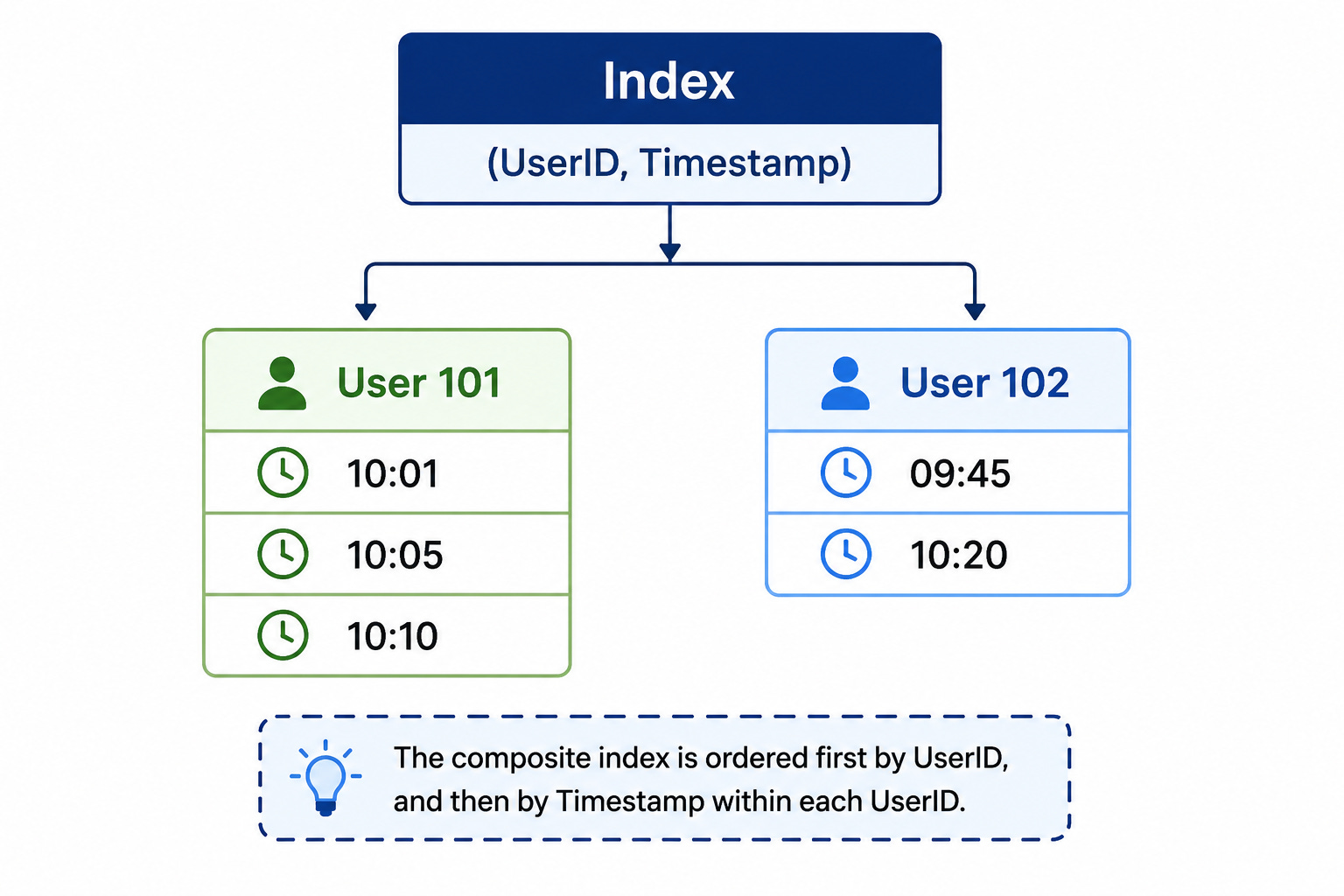
The index is organized primarily by CustomerID.
The database can quickly locate CustomerID values and then narrow results by Status.
Starting with Status alone is much harder.
This concept is often called the leftmost prefix rule.
You do not need to memorize the term.
You should understand the idea.
Index order affects performance.
A System Design Perspective
Imagine you’re designing LinkedIn.
Suppose one of the most common queries is:
Find posts by a user sorted by time.
A composite index such as:
(UserID, Timestamp)
may dramatically improve performance.
The index aligns directly with the query pattern.
This is an important principle.
Indexes should support actual access patterns.
Not theoretical possibilities.
Strong candidates always connect indexes to workloads.
Covering Indexes
Another concept occasionally appears in senior-level interviews.
The idea is surprisingly straightforward.
Suppose a query requests:
SELECT Name, Email
FROM Users
WHERE Email = ?;
If the index already contains:
Email
Name
the database may be able to answer the query directly from the index.
It never needs to read the table itself.
This is known as a covering index.
The index covers everything required for the query.
Fewer disk reads mean faster performance.
For high-traffic systems, this optimization can be valuable.
Why Covering Indexes Matter
Imagine a system handling millions of requests per hour.
Every database lookup consumes resources.
If the database can answer requests directly from the index, it avoids additional work.
The latency savings might be small for one request.
At scale, they become significant.
This is why interviewers sometimes ask:
“Can the query be satisfied entirely from the index?”
They want to see whether you understand how databases reduce unnecessary work.
Selectivity: A Critical Indexing Concept
Not all indexes are equally useful.
Consider a Users table with:
Gender

Male
Female
Suppose the table contains 100 million rows.
Would indexing Gender help?
Probably not.
Why?
Because the index does not narrow the search very much.
Half the table may match each value.
The database still needs to process enormous amounts of data.
Now consider:
Email
Every value is unique.
An index on Email immediately narrows the search to a single row.
This difference is called selectivity.
High-selectivity indexes tend to be more valuable.
Low-selectivity indexes often provide limited benefit.
What Interviewers Want to Hear
Suppose an interviewer asks:
“Would you index Country?”
A weak answer:
“Yes, indexes make queries faster.”
A stronger answer:
“It depends on selectivity and query frequency. If most users belong to a small number of countries, the index may provide limited value.”
That answer demonstrates deeper understanding.
The interviewer is usually evaluating reasoning rather than memorization.
Indexes and Sorting
Indexes do more than accelerate filtering.
They can also accelerate sorting.
Consider:
SELECT *
FROM Orders
ORDER BY CreatedAt DESC;
Without an index, the database may need to sort a large result set.
Sorting large datasets is expensive.
Now imagine an index exists on:
CreatedAt
The data is already organized.
The database can often retrieve rows in sorted order directly.
This avoids an expensive sorting operation.
Large systems frequently rely on this optimization.
Why ORDER BY Appears in Interviews
System design discussions often involve feeds.
Examples include:
LinkedIn feed
Twitter timeline
Instagram posts
News feeds
Many queries look like:
Get the latest content.
Timestamp indexes become extremely important.
Without them, sorting large datasets repeatedly becomes costly.
Strong candidates recognize this quickly.
Indexes and Range Queries
Indexes are also valuable for range-based searches.
Suppose we want:
WHERE CreatedAt
BETWEEN X AND Y
Without an index, the database scans rows.
With an index, the database jumps directly to the starting point and scans only the relevant range.
This dramatically improves performance.
Time-based systems rely heavily on this capability.
Examples include:
Analytics platforms
Logging systems
Monitoring systems
Financial systems
Range queries appear frequently in real-world applications.
Indexes and Pagination
Pagination is another common interview topic.
Suppose we retrieve:
LIMIT 20
ordered by timestamp.
Without proper indexing, the database may perform significant work before finding those twenty rows.
With an index, retrieving the next page becomes much more efficient.
This is one reason timeline-based applications often depend heavily on timestamp indexes.
The connection between indexes and pagination is frequently overlooked by junior engineers.
The Cost of Maintaining Indexes
Everything we’ve discussed so far sounds positive.
Now let’s examine the downside.
Every index requires maintenance.
Suppose a new record arrives.
The database must:
Insert the row
Update the primary index
Update secondary indexes
Maintain internal structures
More indexes mean more work.
This increases write latency.
The impact becomes noticeable in write-heavy systems.
Write Amplification
This phenomenon is sometimes called write amplification.
A single insert may generate multiple internal updates.
For example:
Insert one user.
Update five indexes.
Maintain B-Tree structures.
Flush changes to disk.
The amount of work exceeds the original write.
This is why indexing every column is a bad idea.
The read benefits rarely justify the write costs.
The Beginner Mistake
Many engineers assume:
“If one index helps, ten indexes help more.”
That assumption causes problems.
Each additional index consumes:
Storage
Memory
CPU
Write bandwidth
Eventually the database spends more time maintaining indexes than serving queries.
Indexes should be deliberate.
Not automatic.
Indexes in High-Write Systems
Imagine a logging platform receiving:
Hundreds of thousands of writes per second
The workload differs dramatically from a traditional web application.
Every additional index increases write cost.
The system may prioritize ingestion speed over query flexibility.
As a result, engineers often use fewer indexes than expected.
This surprises many candidates during interviews.
They assume indexing is always beneficial.
The correct answer depends on workload characteristics.
Indexes and System Design Interviews
Most system design interviews eventually reach a performance discussion.
A candidate says:
“The database is becoming a bottleneck.”
The interviewer asks:
“What would you do?”
Many candidates immediately jump to:
Sharding
Replication
Caching
Those solutions may eventually be necessary.
But experienced engineers often ask simpler questions first.
Are queries properly indexed?
Are full table scans occurring?
Are access patterns aligned with existing indexes?
Sometimes a well-designed index eliminates the bottleneck entirely.
Understanding this demonstrates practical engineering judgment.
Reading the Query Before Adding Infrastructure
One of the most valuable lessons in system design is that not every problem requires architectural complexity.
Adding:
Redis
Kafka
Cassandra
Additional services
may help.
But if the root problem is an inefficient query, infrastructure will not solve it.
Strong engineers optimize the simplest layer first.
Indexes often represent that layer.
The Most Important Rule About Indexes
Indexes should follow queries.
Queries should not follow indexes.
This sounds obvious.
Yet many systems violate this principle.
Developers create indexes they think might be useful.
Months later those indexes remain unused.
Meanwhile the database pays the maintenance cost continuously.
The best indexes support actual application behavior.
Everything else is overhead.
Why Index Knowledge Matters
Many system design topics sound glamorous.
Distributed systems.
Microservices.
Event-driven architectures.
Global scalability.
Indexes sound much less exciting.
Yet they frequently deliver larger performance improvements than far more complicated solutions.
A single well-designed index can reduce query latency from seconds to milliseconds.
Few optimizations offer such dramatic returns.
That is why experienced interviewers continue asking about them.
Clustered vs Non-Clustered Indexes
As candidates move into mid-level and senior system design interviews, index discussions often become more detailed.
One topic that appears frequently is the difference between clustered and non-clustered indexes. You do not need to understand every database-specific implementation detail, but you should understand the high-level concept.
The key question is:
How is the data physically organized?
Clustered Index
A clustered index determines how rows are physically arranged on disk.
Imagine a table sorted by UserID.
The records themselves are stored in that order.
Because the data is already organized according to the indexed column, range queries become very efficient. The database can read adjacent records directly without jumping around the storage layer.
Most relational databases allow only a limited number of clustered indexes because data cannot be physically organized in multiple ways simultaneously.
The important takeaway is that the index and the data are closely tied together.
Non-Clustered Index
A non-clustered index works differently.
The table remains stored independently.
The index contains references pointing to the actual records.
Think of it like a book index.
The index tells you where information lives, but the content itself remains elsewhere.
Most secondary indexes are non-clustered.
This distinction matters because lookups may require an additional step. The database finds the location through the index and then retrieves the actual record.
Even with that extra step, non-clustered indexes often provide enormous performance improvements.
Index Seek vs Index Scan
Interviewers occasionally ask how databases actually use indexes.
Two important concepts are index seeks and index scans.
Index Seek
An index seek is the ideal scenario.
The database navigates directly to the required records.
Imagine looking up a specific phone number in a contact list.
You know exactly what you’re searching for.
The search quickly narrows to the correct entry.
This is efficient.
Index seeks are one of the primary reasons indexes exist.
Index Scan
An index scan is different.
The database still uses the index, but it must examine a large portion of it.
This is better than scanning the entire table, but it is still more expensive than a direct seek.
For example, if a query requests a large percentage of records, scanning may become unavoidable.
Strong candidates understand that simply having an index does not guarantee optimal performance.
How the query uses the index matters.
Why Some Queries Ignore Indexes
One of the most surprising things for newer engineers is that databases sometimes ignore indexes entirely.
This sounds counterintuitive.
Why create an index if the database refuses to use it?
The answer comes down to cost.
Databases contain query optimizers that estimate different execution strategies. Sometimes the optimizer determines that a full table scan is actually cheaper than using the index.
Consider a query that returns 90% of a table.
Using the index may require navigating the index structure and then retrieving almost every row anyway.
A full scan may be faster.
This is why indexing is not magic.
The database still evaluates trade-offs.
The Danger of Low-Cardinality Indexes
Earlier we discussed selectivity.
Another related concept is cardinality.
Cardinality refers to the number of unique values in a column.
High-cardinality columns include:
Email
UserID
OrderID
These columns contain many unique values.
Indexes often work very well here.
Low-cardinality columns include:
Gender
Status
Country (sometimes)
These columns contain relatively few unique values.
Indexing them often provides limited benefits.
Suppose a table contains 100 million rows and only two possible values:
Active
Inactive
An index cannot narrow the search very much.
The database still needs to process enormous portions of the table.
Strong candidates understand that not every searchable field deserves an index.
How Indexes Affect Storage
Performance discussions often focus on speed.
Storage matters too.
Every index consumes additional space.
A table with five indexes stores:
The original data
Index 1
Index 2
Index 3
Index 4
Index 5
The storage requirements increase significantly.
For small systems, this may not matter.
At large scale, the cost becomes meaningful.
Imagine storing billions of rows across multiple regions.
Even small increases per record can translate into terabytes of additional storage.
This is another reason indexes should be intentional rather than automatic.
Indexes and Write Performance
One of the most common interview mistakes is discussing only read performance.
Interviewers know that indexes help reads.
They want to know whether you understand the cost.
Every insert requires index updates.
Every update may require index updates.
Every delete may require index updates.
The database is doing more work than simply modifying rows.
As write volume grows, this overhead becomes increasingly important.
This is why write-heavy systems often use fewer indexes than read-heavy systems.
Real-World Example: Social Media Feed
Imagine a social media application.
Users create millions of posts every day.
The feed service frequently executes queries like:
SELECT *
FROM Posts
WHERE UserID = ?
ORDER BY CreatedAt DESC
LIMIT 20;
Without proper indexing, performance deteriorates quickly as the table grows.
A composite index such as:
(UserID, CreatedAt)
dramatically improves retrieval speed.
The database can efficiently locate the user’s posts and return the most recent entries without sorting enormous datasets.
This is the kind of practical reasoning interviewers want to hear.
Not database theory.
Workload-driven design.
Real-World Example: E-Commerce Search
Consider an online store.
Customers frequently search products by:
Category
Brand
Price range
The indexing strategy directly affects user experience.
Suppose product lookups by category happen millions of times per day.
An index on Category may provide substantial value.
Now suppose almost nobody searches by ManufacturerCode.
Creating an index there may provide little benefit.
The lesson remains the same.
Indexes should follow access patterns.
Why Indexes Don’t Solve Every Performance Problem
Candidates sometimes treat indexes as a universal solution.
Database slow?
Add an index.
Query slow?
Add an index.
System struggling?
Add another index.
This mindset creates problems.
Sometimes the bottleneck lies elsewhere.
Examples include:
Poor schema design
Excessive joins
Inefficient queries
Network latency
Disk bottlenecks
Application inefficiencies
Indexes solve specific problems.
They do not solve every problem.
Strong engineers diagnose before optimizing.
The Relationship Between Indexing and Caching
System design interviews frequently explore scaling strategies.
Eventually candidates discuss caching.
At that point interviewers may ask:
“Why not just cache everything?”
This is where indexes remain important.
Caching and indexing solve different problems.
Indexes improve database access.
Caching avoids database access.
Most large systems use both.
The database still needs efficient indexes because cache misses happen. New data arrives. Cache entries expire. Backend systems still execute queries.
Caching complements indexes.
It does not replace them.
Indexes Before Sharding
Another common interview scenario involves database scaling.
Candidates often jump directly to:
Sharding
Replication
Distributed databases
Those solutions may eventually be necessary.
However, experienced engineers usually optimize simpler layers first.
One of the first questions they ask is:
Are queries properly indexed?
Many scaling problems disappear after query optimization.
Introducing distributed complexity before fixing inefficient queries often creates unnecessary work.
This principle applies in both interviews and production systems.
The Framework I Use for Index Decisions
When deciding whether to add an index, I typically ask five questions.
Question 1
Is the query executed frequently?
An index provides little value for rarely used queries.
Question 2
Is the query currently slow?
Optimization should target actual bottlenecks.
Question 3
Does the column have good selectivity?
Highly selective columns tend to benefit most.
Question 4
Can the system tolerate additional write overhead?
Every index increases maintenance costs.
Question 5
Does the index align with real access patterns?
Indexes should reflect how the application actually behaves.
This framework works well in interviews because it demonstrates structured thinking.
What Interviewers Are Actually Testing
Many candidates assume database questions test database expertise.
That is only partially true.
Interviewers are usually evaluating engineering judgment.
They want to know:
Do you understand performance trade-offs?
Can you reason about scale?
Can you connect workloads to optimizations?
Can you justify architectural decisions?
Indexes happen to be an excellent vehicle for evaluating those skills.
A candidate who understands indexing often demonstrates a broader understanding of system performance.
The Most Important Takeaway
If you remember only one thing about indexes, remember this:
Indexes are not free.
They improve read performance by introducing additional storage costs and write overhead.
That trade-off is the foundation of every indexing discussion.
Once you understand it, many database optimization decisions become easier.
Final Thoughts
Database indexes are one of the most important performance tools available to engineers. They allow databases to locate information efficiently, reduce query latency, and support applications at scales that would otherwise be difficult to achieve.
At the same time, indexes introduce costs. They consume storage, increase write complexity, and require careful alignment with access patterns. Poor indexing strategies can waste resources while providing little benefit.
This is why experienced engineers think about workloads first and indexes second. They start by understanding how the application behaves, what queries matter most, and where bottlenecks exist.
Only then do they design indexing strategies.
That mindset is exactly what system design interviewers are looking for. They are not testing whether you can memorize database terminology. They are testing whether you can reason about performance, understand trade-offs, and make practical engineering decisions.
Indexes happen to be one of the clearest places where those skills become visible.