
Inside Meta's New AI-Enabled Coding Round: What Changed and How to Prep
No more two LeetCode problems in 45 minutes. Meta replaced one coding round with a 60-minute AI-assisted session. Here is exactly what happens inside it.

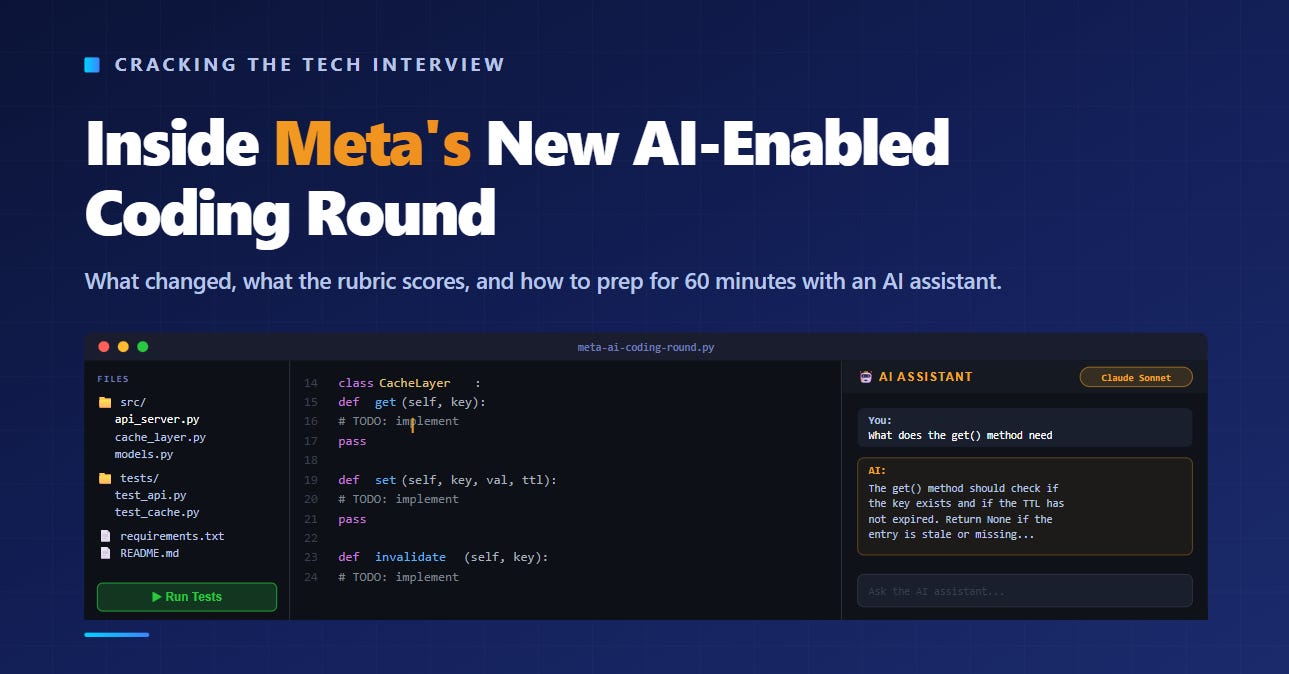
Meta changed its coding interview.
Not a small tweak. A structural overhaul.
Starting in October 2025, Meta began replacing one of the two traditional coding rounds in its onsite loop with a completely new format. Instead of solving two algorithmic problems on a blank screen, you now spend 60 minutes working inside a real codebase with an AI assistant sitting right next to you.
This is not a rumor. It is not a pilot anymore. It is being rolled out for all back-end and ops-focused roles in 2026. Candidates at E6 and below get one traditional coding round plus one AI-assisted round. Candidates at E7 and above get only one coding round, and it will be AI-assisted.
If you are preparing for a Meta interview right now, there is a very good chance you will sit this round. And if you prepare the old way, you will fail it.
This article explains exactly what happens inside this interview, what the rubric actually scores, and how to prepare for it in a way that most candidates are not doing.
What the Old Round Looked Like
Let me start with what you are probably used to.
The traditional Meta coding interview gave you 45 minutes and two algorithmic problems. You opened a blank editor. The interviewer read you a problem statement. You solved it from scratch, talked through your approach, and wrote clean code. Then you did it again with a second problem.
The skills being tested were clear. Pattern recognition. Data structure selection. Algorithm implementation speed. Edge case handling. Communication.
You could prepare for this with LeetCode. Hundreds of candidates did exactly that. Grind 200 tagged Meta problems, memorize the patterns, and show up ready to perform.
That playbook no longer covers the full interview.
What the New Round Looks Like
The AI-enabled round is 60 minutes, not 45. You get one extended problem, not two. And the environment is completely different.
You work inside a three-panel CoderPad layout. File explorer on the left. Code editor in the middle. AI assistant plus problem instructions on the right.
This is not a blank screen. You inherit a codebase. There are multiple files, dependencies, configuration files, and existing tests. The code is already partially written. Your job is to understand it, extend it, fix it, or build on top of it.
The problem will follow one of three scenarios. Building a feature into an existing codebase. Extending partially implemented code. Or debugging a broken implementation.
And the AI assistant is right there the entire time.
The models available include GPT-4o mini, GPT-5, Claude Sonnet 4, Claude Haiku 4.5, Gemini 2.5 Pro, and Llama 4 Maverick. You can switch between them during the interview. You type your prompts in the chat sidebar, and the AI responds with suggestions, code snippets, or explanations.
Here is the critical thing to understand. The AI can respond in the chat panel, but it cannot directly edit your files. You still have to write or paste all code yourself. The AI is a collaborator, not an autopilot.
What the Rubric Actually Scores
This is the part that most prep guides get wrong.
People assume this round is testing prompt engineering. It is not. The official rubric evaluates three things: problem solving, code development and understanding, and verification and debugging.
Let me break those down.
Problem Solving
Can you take a vague problem and turn it into a clear plan?
This has not changed from the old format. The interviewer still wants to see you clarify the requirements, ask smart questions, and think through the approach before writing code. The difference is that the problems are more open-ended now. Instead of “find the kth largest element in an array,” you might get “add a caching layer to this API service.” The scope is bigger and more ambiguous.
Code Development and Understanding
Can you read code you did not write and build on top of it?
This is the biggest shift. The old round tested whether you could write code from scratch on a blank screen. The new round tests whether you can navigate an unfamiliar codebase, understand how the pieces fit together, and make safe changes without breaking existing functionality.
This is much closer to what actual engineering looks like on the job. You rarely write code from scratch at Meta. You inherit millions of lines of existing code, understand the architecture, and extend it.
Verification and Debugging
Can you find and fix errors, and can you prove your code works?
The new round has a green “Run Tests” button. You can execute the unit test suite at any time. Speed matters, but correctness and verification matter more. The interviewer wants to see you running tests frequently, catching failures early, and debugging incrementally instead of writing everything at once and hoping it works.
How to Use the AI (and How Not To)
Meta officially says AI usage is optional and will not affect your score.
That is technically true. But practically, it is misleading.
Using AI properly will give you a productivity edge because of the associated boost. The round is 60 minutes and the problems are larger than the old format. You will struggle to finish without leveraging the AI for the mechanical parts of the work.
But here is where most candidates go wrong. They use the AI as an end-to-end solver. They paste the entire problem description into the chat, hit enter, copy the output into their editor, and hope it works.
This is the fastest way to fail the round.
Big, unreviewed pastes from AI are a red flag. Small, verified iterations show control.
The interviewer is watching every AI interaction in real time. They can see what you typed, what the AI returned, and whether you actually read the output before using it. If you blindly copy large blocks of AI-generated code without reviewing them, the interviewer writes “no engineering judgment” in their notes.
What “Using AI Well” Looks Like
The best candidates treat the AI as a junior developer who is fast but unreliable. You give it well-defined, scoped tasks. You review everything it produces. And you catch the mistakes it makes.
Here are the tasks where AI helps you the most.
Boilerplate and scaffolding. If you need a class template, a file parser, or a basic test structure, the AI can generate it in seconds. This saves you from typing mechanical code that does not demonstrate any skill.
Understanding unfamiliar code. You can paste a function from the codebase into the chat and ask “what does this do?” The AI will explain it. This is significantly faster than reading through the code yourself, especially when you are under time pressure.
Generating test cases. Ask the AI to write unit tests for a function you just built. It will produce a set of basic cases quickly. Your job is to review them, add edge cases it missed, and run them.
Syntax you forgot. If you cannot remember the exact syntax for reading a file in Python or the API for a particular library, the AI will give it to you instantly. This is a perfectly legitimate use.
Here are the tasks where AI will hurt you.
Core algorithmic logic. If the problem requires a specific algorithm or data structure choice, you need to make that decision yourself and explain why. Asking the AI “how should I solve this?” and copying its answer signals that you cannot think independently.
Debugging complex logic errors. The AI can sometimes spot syntax errors. But when the logic is subtly wrong, the AI is more likely to send you down a rabbit hole than help you find the real issue. You are better off reading your own code carefully and tracing through examples.
Anything you cannot explain. If the interviewer asks “why did you use a hash map here?” and your honest answer is “because the AI suggested it,” you have lost the point. You must understand and defend every line of code you submit, even if the AI wrote the first draft.
The Pipelining Strategy
The smartest candidates use a pipelining strategy. They ask the AI to generate code for one part of the problem, and while it processes, they explain their reasoning to the interviewer or review previous AI outputs.
This is the highest-leverage technique for the round. Instead of sitting idle while the AI generates a response, you are earning points on communication at the same time. You are showing the interviewer that you can manage parallel workstreams, which is exactly what production engineering looks like.
The Three Scenarios You Will Face
Based on candidate reports and published guides, the AI-enabled round presents one of three problem types. You should practice all three.
Scenario 1: Build a Feature
You receive a working codebase. A small web server, a data processing pipeline, or an internal tool. The interviewer asks you to add a new feature to it.
The challenge here is not the algorithm. The challenge is understanding the existing code well enough to know where your new feature should live, which interfaces to use, and how to avoid breaking existing functionality.
Your first move should be reading the existing codebase for five to ten minutes before writing anything. Use the AI to help you understand unfamiliar files. Look at the test suite to understand what the expected behavior is. Then plan your changes and implement them incrementally, running tests after each significant change.
Scenario 2: Extend Partially Implemented Code
You receive a codebase with a feature that is half-built. Some functions are implemented. Others are stubbed out with comments like “TODO: implement this.” Your job is to finish the implementation.
The trap here is ignoring the existing code and rewriting from scratch. The interviewer wants to see that you can read the partially completed work, understand the intended design, and continue in the same style. If the existing code uses a particular pattern, follow it. If it uses a specific naming convention, match it. Consistency signals professionalism.
Scenario 3: Debug a Broken Implementation
You receive a codebase that is supposed to work but does not. The tests are failing. Your job is to find the bugs and fix them.
This is the scenario where blind AI usage is most dangerous. If you paste the broken code into the AI and ask “fix this,” the AI might change things that are not broken and introduce new problems. The better approach is to run the tests first, read the failure messages, isolate the failing cases, and then reason about the root cause yourself. Use the AI to confirm your hypothesis, not to generate one.
How to Prepare
The old preparation strategy was simple. Open LeetCode. Filter by Meta. Solve 150 to 200 problems. Show up.
That still helps. Your data structure intuition, pattern recognition, and debugging instincts all come from algorithmic practice. Do not stop doing it. But you need to add three new preparation habits on top.
1. Practice With Multi-File Projects
The single biggest adjustment is getting comfortable with code you did not write. Download a small open-source project in your preferred language. Read through the codebase. Add a feature. Fix a bug. Write tests. Do this until navigating an unfamiliar project feels natural instead of stressful.
This is a fundamentally different skill from solving isolated algorithm problems. In a LeetCode problem, you start with a blank file and you control everything. In the AI-enabled round, you start with someone else’s code and you have to work within their architecture.
2. Practice Using AI as a Tool, Not a Crutch
Open a coding problem. Set a timer for 60 minutes. Use an AI assistant while you solve it. But follow the rules of the real interview. Do not paste the entire problem into the AI. Break the work into small tasks. Delegate mechanical work to the AI. Do the thinking yourself. Review every line the AI gives you.
Pay special attention to the moments when the AI gives you wrong code. These moments are practice for the real interview, where the AI will definitely make mistakes and the interviewer will be watching to see if you catch them.
3. Request a Practice CoderPad Session
Meta recruiters can provide practice CoderPad sessions with the AI sidebar enabled. If you have a recruiter contact, ask for one. Getting familiar with the actual interface before the real interview removes a significant source of stress.
If you do not have access to the official practice environment, use any CoderPad-style tool with an AI sidebar. The specific tool matters less than the habit of working with AI inside a coding environment instead of using it in a separate tab.
The Mindset Shift
The old coding interview asked one question. Can you solve this problem?
The new coding interview asks a different question. Can you ship working code in a real environment?
That shift changes everything. Memorizing algorithms still matters, but it is no longer enough. You also need to read unfamiliar code quickly, use tools effectively, test incrementally, and communicate your reasoning while you work.
If this feels overwhelming, here is the good news. You are already halfway there. The algorithmic thinking you built through traditional prep transfers directly into the new format. You still need to recognize patterns, choose the right data structures, and handle edge cases. Those skills do not go away. They just get layered underneath a new set of practical skills.
The candidates who struggle are the ones who prepared only the old way and show up expecting two LeetCode problems. The candidates who succeed are the ones who practiced the old way and the new way.
If your foundational coding patterns feel shaky, the place to solidify them is Grokking the Coding Interview: Patterns for Coding Questions. It is built around the 15 core patterns that show up across all coding interviews, including Meta’s new format. The problems have changed. The patterns underneath them have not.